
GPSTime is the control and display program for the CNS Clock II and for other GPS timing receivers that use the Motorola Oncore protocol. It runs on Windows and on Linux.
It shows the time from the receiver in large digits, the satellites in view and the receiver’s position. It sets the receiver up for precise timing and logs its data. With a time interval counter it measures the receiver’s 1PPS against another clock.
Current version 1.2.12, released Nov 6, 2026. What changed
Runs on
Windows 10 and Windows 11, 64-bit.
Linux on 64-bit Intel and AMD processors: packages for the Red Hat, Fedora, openSUSE, Debian and Ubuntu families, and a tar file for other distributions.
Works with
The CNS Clock II. Motorola Oncore and M12 timing receivers with 6, 8 or 12 channels. The Synergy Systems SSR series.
HP, Agilent and Keysight 53131A, 53132A and 53230A counters, for time interval measurements.
Registration
Without a registration password GPSTime runs for 30 days as an evaluation copy. The password is entered in Help > About GPSTime.
The password comes with a CNS Clock II, or from CNS Systems. GPSTime takes the same password on Windows and on Linux, the same as Tac32Plus.
What GPSTime does
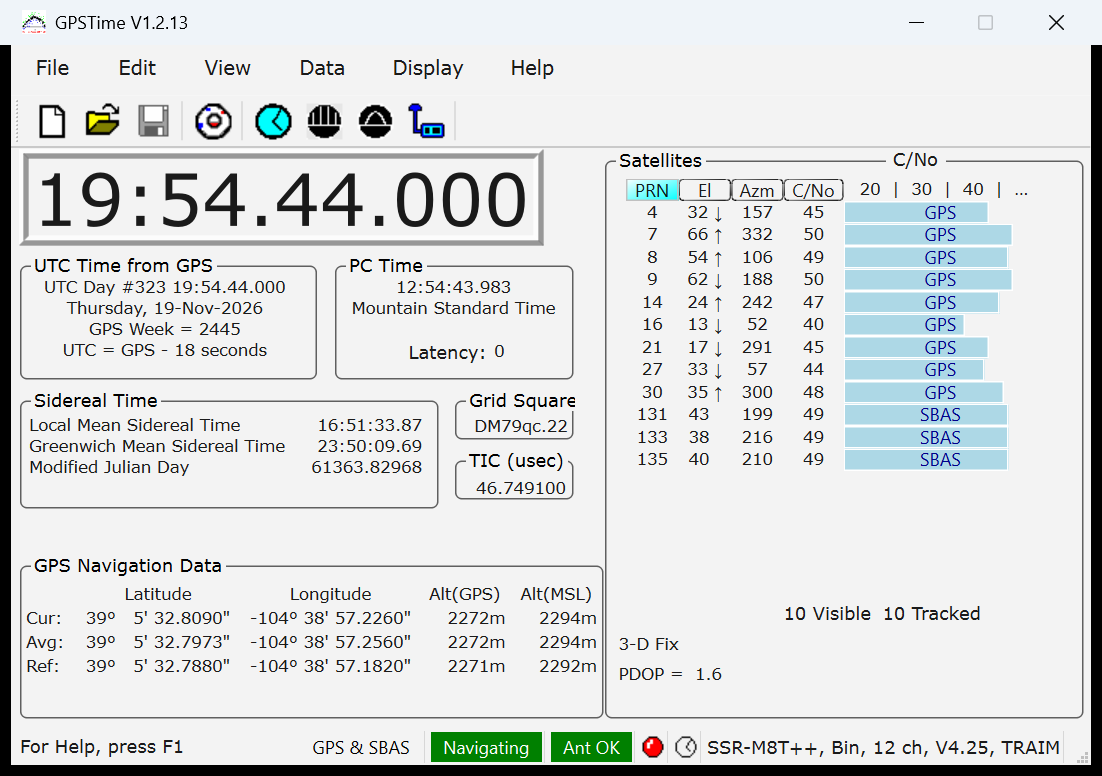
The time, large
UTC from the receiver in large digits. The display can also show the PC’s own time, Greenwich or local mean sidereal time, the Modified Julian Day, the error of the PC clock, or the reading of a time interval counter. Clock ticks and an out-of-lock warning can be played as sound.
Satellites and signal
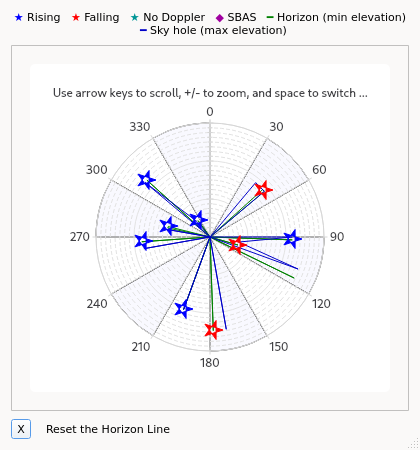
Every satellite the receiver tracks, with its elevation, azimuth and signal strength (C/No in dB-Hz): GPS, GLONASS, Galileo, BeiDou, QZSS and SBAS, as far as the receiver supports them. The Satellite Az-El Chart draws them on the sky, rising satellites in blue and setting ones in red, with the horizon and the sky hole of the antenna’s site.
Position
The current, the averaged and the reference position, in three coordinate formats, with the grid square. Position averaging and the receiver’s self-survey are started from the Data menu, and the reference position can be set from the average, from the current position or by hand.
Timing setup
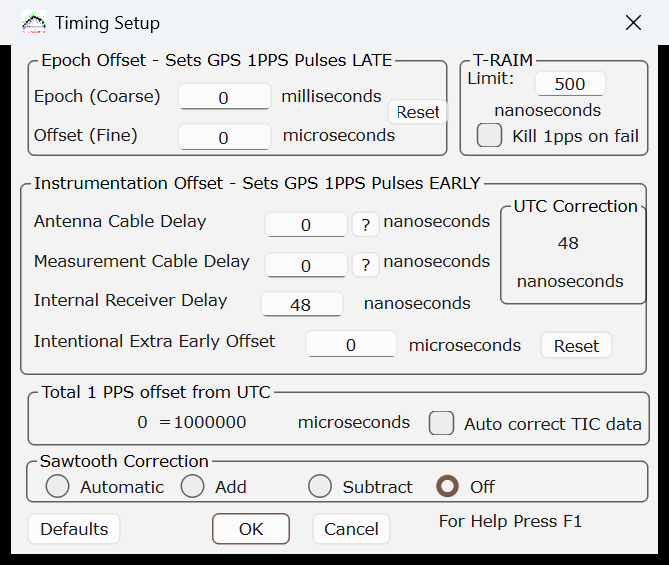
The antenna cable delay, the measurement cable delay, the receiver’s internal delay, an intentional offset of the 1PPS, the T-RAIM limit and the sawtooth correction, in one window. A calculator gives the delay of a coaxial cable.
Time interval counter
GPSTime reads a time interval counter that compares the receiver’s 1PPS with another clock. It shows the reading, can correct it for the timing setup and for the receiver’s sawtooth, and logs every reading or the averages over a chosen period.
Logs
GPS data logs with position, velocity and time, in NMEA form, or as the receiver’s raw data, and TIC data logs, in a new file each day. The PVT log has the same format as Tac32Plus’s, so one reader serves both programs.
Receiver control
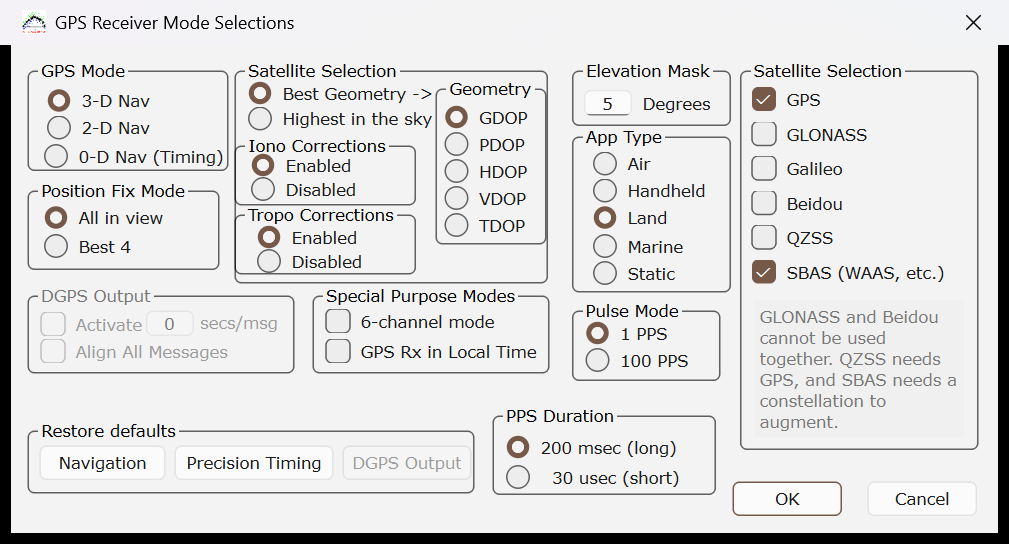
Navigation or timing mode, the satellite systems to use, the elevation mask, the pulse rate and its length, in the GPS Receiver Mode Selections window. Self-test, self-survey, manual satellite selection and a window for typing receiver commands are there for the expert, and two windows show the receiver’s raw data and its ID message.
Remote control
With the remote control link switched on, another computer can start, stop and query the logs over the network (Telnet), by hand or from a program.
Several copies on one PC
Started with /inst:name, GPSTime runs as a copy of that name with settings of its own – for a second receiver or more counters – and /dinst:name removes such a copy’s settings. Each copy runs once at a time. The switches are the same as Tac32Plus’s.
Updates and help
Help > Check for Updates finds a newer release and shows what changed. On Windows it downloads the new version, checks it and installs it; on Linux it opens the download page, where the new package is. GPSTime also looks once a day, which can be switched off.
The help opens in its own window, with a contents tree beside the page.
GPSTime or Tac32Plus?
GPSTime is the replacement for Tac32Plus. The two programs work with the same receivers, give the same displays and write the same logs, and they are released in step: each GPSTime release has a Tac32Plus release that matches it.
GPSTime
For Windows and for Linux. Written with Qt, so that one source serves both. Choose it for a new installation and for any computer that runs Linux.
Tac32Plus
The original program, for Windows only. Choose it where one of the functions in the table below is needed that GPSTime does not have yet.
| GPSTime | Tac32Plus | |
|---|---|---|
| Runs on | Windows 10 and 11 (64-bit) Linux (64-bit Intel and AMD) | Windows 10 and 11 (64-bit) |
| Finds and installs its own updates | On Windows; on Linux it finds them and opens the download page | Yes |
| Network time server (SNTP) | Not yet | Yes |
| Several named instances on one PC | Yes | Yes |
| Time interval counters at one time | Up to eight | Up to eight |
| Help | In its own window, with a contents tree | Windows help file |
Documentation and support
- GPSTime has its own help: Help > Help Topics, or F1.
- The CNS Clock II manual (PDF) describes the clock and the software.
- Questions, problems and suggestions: Contact Us.